


Introduction to the software Our software design is based on Microsoft Foundation Classes (MFC), which is widely used to create Office-Style user interface with multiple controls. Since the design uses MFC, which is a Microsoft application, the software is developed using Microsoft Visual Studio and C++ programming language, and is able to packaged into an executable file so that the customer can easily access to the software as long as there’s a Windows machine. The overall objective of the software consists of reading a data value for each sensor, output the current value of solar power it is associated with. If the value sampled from the sensor is lower than a threshold, meaning the sensor is covered by a cloud, a warning will be prompted. From the data collected over each sample, the program is able to output an estimate time when the cloud will arrive to the solar panel, an estimate direction of the cloud movement, an estimate power drop percentage, an estimate solar array output value when they’re covered by cloud, and plots of histogram of all involving sensors data. The user interface of the software will consist of a map of the area and a simulation of the cloud cover from the data. Initially a Google map satellite image of the area around the solar array will be loaded, which is the area around the Michigan State solar panel by default. In this user interface there will be two modes, editing mode and warning mode. In the editing mode, the customer will be able to add an arbitrary number of sensors and a solar panel in the map, both in the format of pictures, and simply grab the sensor or solar panel to whatever location in the map to match the real location. In the warning mode, these locations will be fixed and our warning algorithm will be activated. There’re two submode in the warning mode, a show map mode and a show plot mode. In the show map mode, the current value associated with each sensor will be shown under the sensor image, and the estimate arrival time will be shown under the solar panel. In the show plot mode, the map will be shown on the left top of the window, with value under the map, and plots of sensor value on the right. In addition to the basic warning feature, the software will be able to save the position of the sensors and solar panels so that the user does not need to edit the location each time the software is started. However, all the algorithms and calculation will be performed based on the sensor and solar panel location in the software instead of the real location, so the prediction will be accurate as long as the map loaded is drawn to scale and the sensor and solar panel location in the software is correct. Technical details The interface
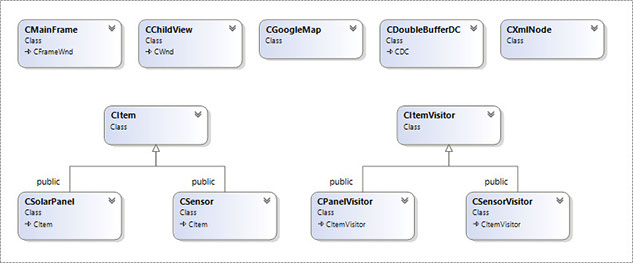
There’re two basic requirement for the interface between the hardware and the software. The hardware need to convert the analog value into a digital value, and output the value, together with a specific name, to a server; the software needs to be able to connect to the server in order to read the data. (need more information, matlab program, the first website, and the way of formatting the output string.) The software This is the class diagram generated by the visual studio, which shows the basic architecture of the software. The software basically consists of the 11 classes, and one additional class for input dialog box. CMainFrame is the main program, which is used for handling different events in MFC application. CChildview is responsible for handling the user interface, including handle the buttons and interact with other objects. CGoogleMap serves as the container of all sensors and the solar panel, which load the map and the data from the micro-controller specific website into the software and pass it to the sensors. CItem is the base class for CSolarPanel and CSensor, which contains the information that is common to both sensors and the solar panel in the software, including location information and the functionality of moving the item in the map. CSolarPanel is the class the simulate the solar panel, together with our algorithm to predict all the information we want. CSensor is the class that simulate the sensor, including functionality of processing the data and send the signal to the solar panel. CItemVisitor is the base class of CPanelVisitor and CSensorVisitor, the three classes are used for collecting all location, data, flag information from the CSensor to CSolarPanel during the warning mode. CDoubleBufferDC is a class that can eliminating flicker, which is created by Keith Rule. CXmlNode adds support for saving and loading the sensor network and solar panel, which is created by Dr. Charles Owen.